【Python编码规范】基础语法

本系列为《编写高质量代码-改善Python程序的91个建议》的读书笔记。

温馨提醒:在阅读本书之前,强烈建议先仔细阅读:PEP规范,增强代码的可阅读性,配合优雅的pycharm编辑器(开启pep8检查)写出规范代码,是Python入门的第一步。

Python 基础语法,即Python程序的基本要素,分为:

  • 基本数据类型:数字、字符串、列表、字典、集合、元组等;
  • 常见的语法:条件、循环、函数、列表解析等。

建议19:有节制地使用from…import语句

Python提供了3种方式引入外部模块:import语句,from...import...__import__函数。

__import__函数可以显式地将模块名称作为字符串传递并赋值给命名空间的变量。

  • 在使用import时需要注意以下事项:

1)一般尽量优先使用import a形式,如果访问B时需要使用a.B的形式;
2)有节制地使用from a import B形式,可以直接访问B
3)尽量避免使用from a import *,减少污染命名空间。

Pythonimport机制:Python在初始化运行环境的时候会预先加载一批内建模块到内存中,其相关信息被存放在sys.modules中。

  • from a import ...无节制的使用产生的问题:

1)命名空间的冲突;

文件a.py

1
2
def add():
print "add in module A."

文件b.py

1
2
def add():
print "add in module B."

测试文件importtest.py

1
2
3
4
5
6
from a import add
from b import add


if __name__ == '__main__':
add()

2)循环嵌套导入的问题。

  • 可以考虑from...import的情况:

1)当只需要导入部分属性或方法时;
2)模块中的这些属性和方法访问频率较高导致使用“模块名.名称”的形式进行访问过于烦琐时;
3)模块的文档明确说明需要使用from...import形式,导入的是一个包下面的子模块,且使用from...import形式能够更为简单和便捷时。

建议20:优先使用absolute import来导入模块

Python2.4以前默认为隐式的relative import,局部范围的模块将覆盖同名的全局范围的模块。Python2.5后虽然默认的仍是relative import,但它为absolute import提供了一种新的机制,在模块中使用from __future__ import absolute_import语句进行说明后再进行导入。同时还通过点号.提供了一种显式进行relative import的方法。

相比于absolute importrelative import在实际应用中反馈的问题较多(Python3中已移除),absolute import的可读性和出现问题后的可跟踪性更好,因此,推荐优先使用absolute import

建议21:i+=1不等于++i

Python解释器会将++i操作解释为+(+i),其中+表示正数符号。对于--i也是类似。

  • 实例一
1
2
3
>>> i=1
>>> ++i
1
  • 实例二:无限循环
1
2
3
4
5
i = 0
ls = [1, 2, 3, 4, 5, 6]
while i < len(ls):
print ls[0]
++i

建议22:使用with自动关闭资源

  • with 语句的语法:
1
2
with 表达式 [as 目标]:
代码块
  • 包含with语句的代码块执行过程如下:

1)计算表达式的值,返回一个上下文管理器对象;
2)加载上下文管理器对象的__exit__()方法以备后用;
3)调用上下文管理器对象的__enter__()方法;
4)若with语句中设置了目标对象,则将__enter__()方法的返回值赋值给目标对象;
5)执行with中的代码块;
6)若步骤5)中的代码正常结束,调用上下文管理器对象的__exit__()方法,其返回值直接忽略;
7)若步骤5)中的代码执行过程中发生异常,调用上下文管理器对象的__exit__()方法,并将异常类型,值及traceback信息作为参数传递给__exit__()方法。若__exit__()的返回值为false,则异常会被重新抛出;若__exit__()的返回值为true,则异常会被挂起,程序继续执行。

建议23:使用else子句简化循环(异常处理)

1
2
3
4
5
6
7
8
9
10
11
12
13
def is_prime(number):
"""

:param number:
:return:
"""

for i in xrange(2, number):
for j in xrange(2, i):
if i % j == 0:
break
else:
print '{0} is a prime number.'.format(i)

当循环“自然”终结(循环条件为假)时else从句会被执行一次;当循环是由break语句得到中断时,else子句就不被执行。

建议24:遵循异常处理的几点原则

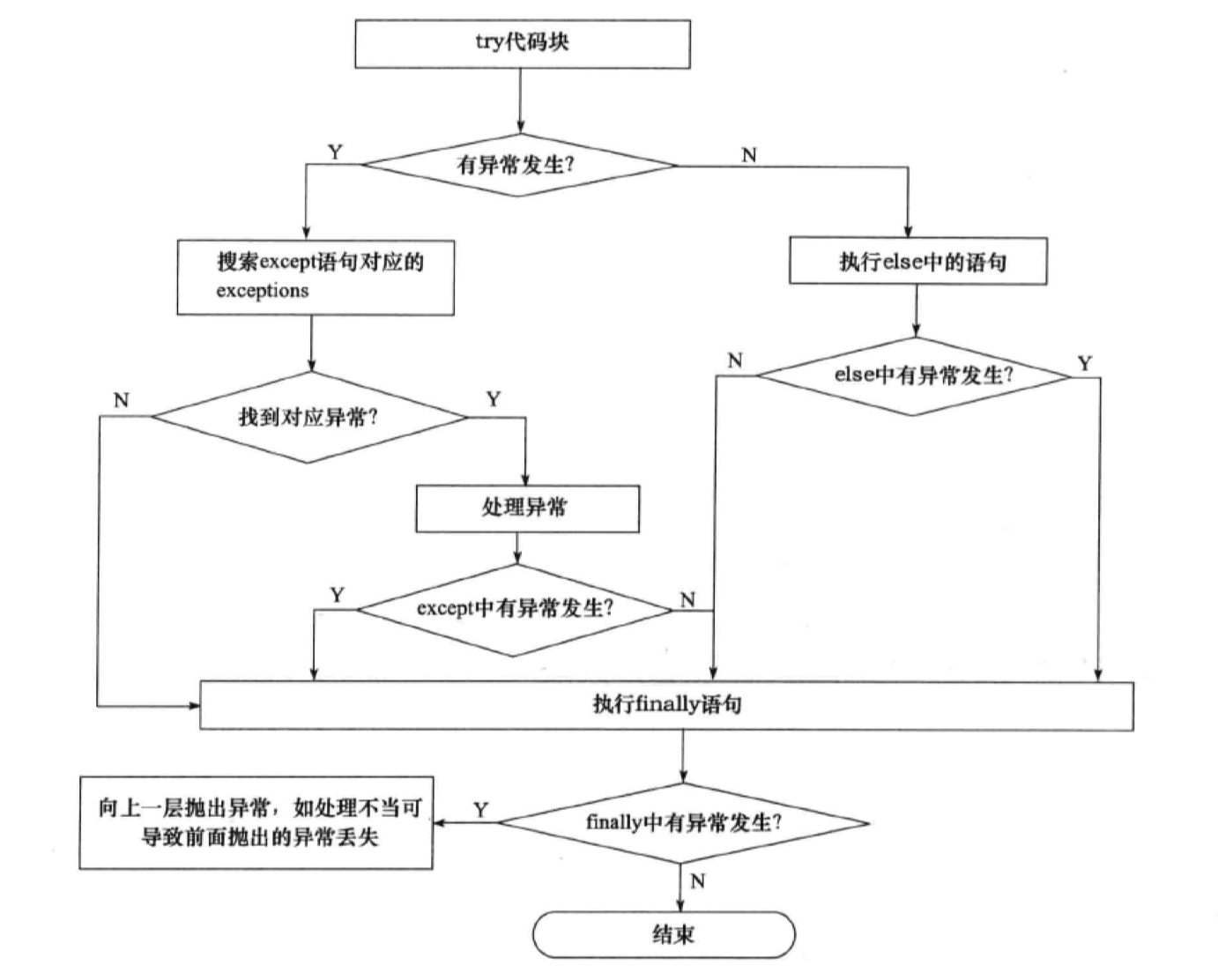
Python中常用的异常处理语法是:tryexceptelsefinally,可以有多种组合。

  • 异常处理流程图如下:

异常处理流程图

  • 异常处理遵循的基本原则:

1)注意异常的粒度,不推荐在try中放入过多的代码;
2)谨慎使用单独的except语句处理所有异常,最好能定位具体的异常;
3)注意异常捕捉的顺序,在合适的层次处理异常;向上层传递的时候需要警惕异常被丢失的情况,可以使用不带参数的raise来传递;
4)使用更为友好的异常信息,遵循异常参数的规范。

建议25:避免finally中可能发生的陷阱

无论try语句中是否有异常抛出,finally语句总会被执行。

1
2
3
4
5
6
7
8
9
10
11
12
13
14
15
16
# -*-coding:UTF-8 -*-

def test(a):
try:
if a <= 0:
raise ValueError("data can not be negative.")
else:
return a
except ValueError as ex:
print ex
finally:
print "The end!"
return -1

print test(0)
print test(2)

建议26:深入理解None,正确判断对象是否为空

Python中以下数据会被当作空处理:

  • 常量None
  • 常量False
  • 任何形式的数值类型零,如00L0.00j
  • 空的序列,如‘’()[]
  • 空字典,如{}
  • 当用户定义的类中定义了nonzero()方法和len()方法,并且该方法返回整数0或者布尔值False

注意None的特殊性体现在它既不是0False,也不是空字符串,它就是一个空值对象;其数据类型为NoneType,遵循单例模式,是唯一的,因而不能创建None对象。所有赋值为None的变量都相等,并且None与任何其他非None的对象比较结果都是False

1
2
3
4
5
6
7
8
9
10
11
12
>>> id(None)
140735411631784
>>> None == 0
False
>>> None == ""
False
>>> a = None
>>> id(a)
140735411631784
>>> b = None
>>> a == b # 所有赋值为`None`的变量都相等
True
  • 实例:列表判空
1
2
3
4
5
ls = []
if ls is not None:
print "ls is: ", ls
esle:
print "ls is None"
  • 以上程序运行输出为:ls is: [],显然不是我们的预期结果。应修正为:
1
2
3
4
5
ls = []
if ls:
print "ls is: ", ls
esle:
print "ls is None"

建议27:连接字符串优先使用join而不是+

1)使用操作符+连接字符串的方法

1
2
3
>>> str1, str2, str3 = "testing ", "string ", "concatenation "
>>> str1 + str2 + str3
'testing string concatenation '

2)使用join方法连接字符串的方法

1
2
>>> ''.join([str1, str2, str3])
'testing string concatenation '
  • 性能测试函数
1
2
3
4
5
6
7
8
9
10
11
12
13
14
15
16
17
18
19
20
21
22
23
24
25
26
27
28
29
30
# -*-coding:UTF-8 -*-

import timeit

str_list = ["It is a long value string will not keep in memory "
for n in xrange(10000)]


def join_test():
return ''.join(str_list)


def plus_test():
res = ''
for i, v in enumerate(str_list):
res += v

return res


if __name__ == '__main__':

join_timer = timeit.Timer("join_test()", "from __main__ import join_test")
print join_timer.timeit(number=10) # 0.00255298614502
print join_timer.timeit(number=100000) # 13.4903669357


plus_timer = timeit.Timer("plus_test()", "from __main__ import plus_test")
print plus_timer.timeit(number=10) # 0.0193991661072
print plus_timer.timeit(number=100000) # 400.628134012

从以上测试效果看,join()方法的效率要高于+操作符,尤其是字符串规模较大时,两者的效率十分明显。

执行一次+,就会申请一块新的内存空间,并将上一次的操作结果和本次的右操作数复制到新申请的内存空间。时间复杂度为 $O(n^2)$;
对于join(),会首先计算需要申请的总的内存空间,然后一次性申请所需内存并将字符序列中的每一个元素复制到内存中去,时间复杂度为$O(n)$。

建议28:格式化字符串时尽量使用.format方式而不是%

Python中内置%操作符和.format方式都可以用作格式化字符串。

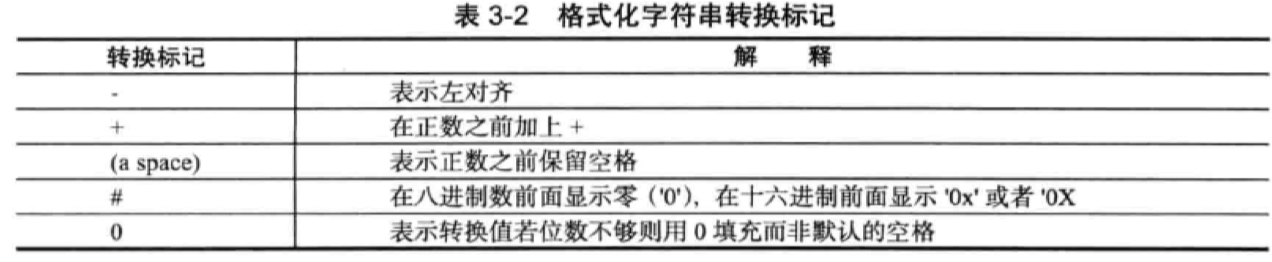
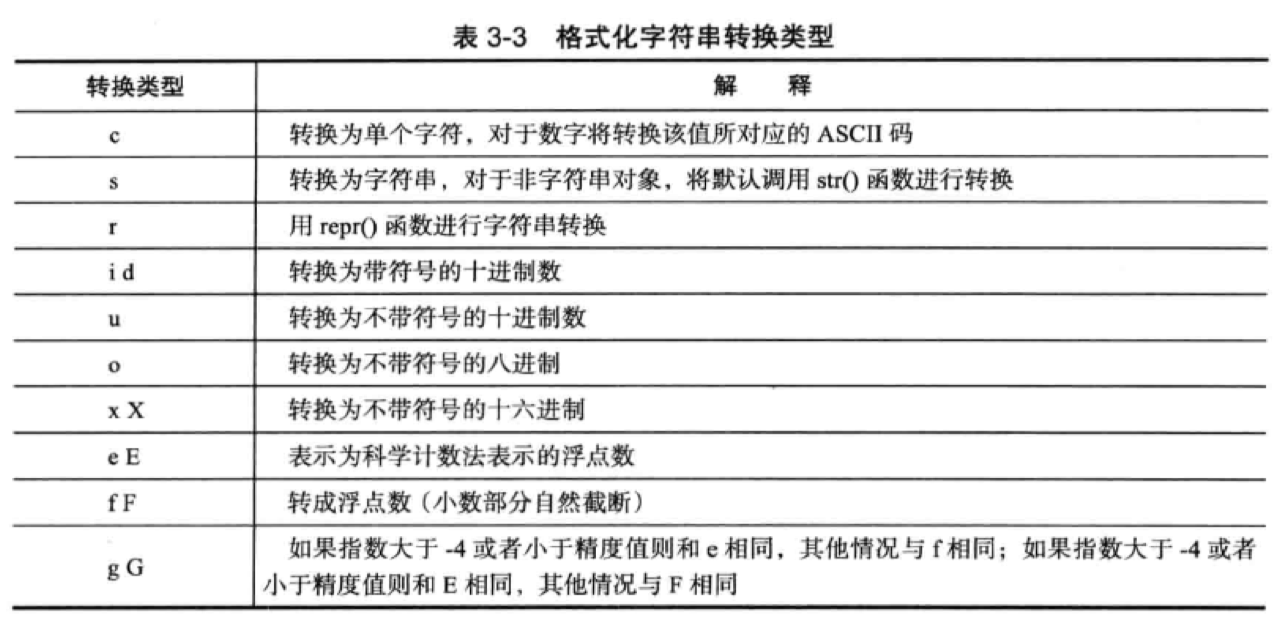
  • %转换说明符的基本形式为:
1
%[转标记][宽度[.精确度]] 转换类型

格式化字符串转换标记

格式化字符串转换类型

常见用法

1)直接格式化字符或者数值

1
2
>>> print "your score is %06.1f" % 9.5
your score is 0009.5

2)以元组的形式格式化

1
2
3
4
5
6
>>> import math
>>> item_name = 'circumference'
>>> radius = 3
>>> print "The %s of a circle with radius %f is %0.3f" % \
... (item_name, radius, math.pi*radius*2)
The circumference of a circle with radius 3.000000 is 18.850

3)以字典的形式格式化

1
2
3
>>> item_dict = {'item_name': 'circumference', 'radius': 3, 'value': math.pi*radius*2}
>>> print "The %(item_name)s of a circle with radius %(radius)f is %(value)0.3f" % (item_dict)
The circumference of a circle with radius 3.000000 is 18.850
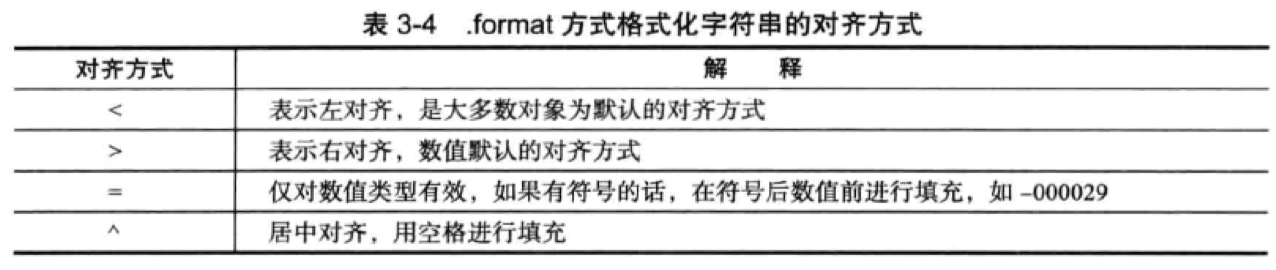
  • .format方式格式化字符串的基本语法为:
1
.format([[填充符]对齐方式][符号][#][0][宽度][,][.精度][转换类型])

format对齐方式

format符号列表

常见用法

1)使用位置符号

1
2
3
>>> print "The number {0:,} in hex is: {0:#x}," \
... "The number {1} in oct is: {1:#o}".format(4746, 45)
The number 4,746 in hex is: 0x128a,The number 45 in oct is: 0o55

2)使用名称

1
2
3
>>> print "The max number is {max}, the min number is {min}, the average number is {avg}"\
... .format(max=9, min=3, avg=6)
The max number is 9, the min number is 3, the average number is 6

3)通过属性

1
2
3
4
5
6
7
8
9
10
11
>>> class Customer(object):
... def __init__(self, name, sex, phone):
... self.name = name
... self.sex = sex
... self.phone = phone
...
... def __str__(self):
... return 'Customer ({self.name}, {self.sex}, {self.phone})'.format(self=self)
...
>>> print Customer("Lisa", "F", "13304634561")
Customer (Lisa, F, 13304634561)

4)格式化元组的具体项

1
2
3
>>> point = (1, 5)
>>> print 'X:{0[0]}; Y:{0[1]}'.format(point)
X:1; Y:5
  • 为什么要尽量使用format方式而不是%操作符来格式化字符串?

1)format方式在使用上较%操作符更为灵活;使用format方式时,参数的顺序与格式化的顺序不必完全相同;
2)format方式可以方便地作为参数传递;
3)%最终会被.format方式替代;
4)%方法在某些特殊情况下使用需要特别小心。如下例,特别小心 ,

1
2
3
4
5
6
7
>>> items = ("mouse", "mobilephone", "cup")
>>> print "items list are %s" % (items)
Traceback (most recent call last):
File "<input>", line 1, in <module>
TypeError: not all arguments converted during string formatting
>>> print "items list are %s" % (items,)
items list are ('mouse', 'mobilephone', 'cup')

建议29:区别对待可变对象和不可变对象

Python中一切皆对象,每一个对象都有一个唯一的标识符(id()),类型(type())以及值。

  • 可变对象:字典,字节数组,列表;
  • 不可变对象:数字,字符串,元组。

  • 实例

1
2
3
4
5
6
7
8
9
10
11
12
13
14
15
16
17
18
19
20
21
22
23
24
25
26
27
28
29
30
31
32
33
34
35
36
#!/usr/bin/env python
# coding=utf-8


class Student(object):
"""
区别可变对象与不可变对象
"""

def __init__(self, name, course=list()):
self.name = name
self.course = course

def add_course(self, course_name):
self.course.append(course_name)

def print_course(self):
for index, item in enumerate(self.course):
print item, ' '
print '\n'


if __name__ == '__main__':

stu_a = Student("Wang Yi")
stu_a.add_course("English")
stu_a.add_course("Math")
print "{0}'s course: ".format(stu_a.name)
stu_a.print_course()
print "================================="

stu_b = Student("Li san")
stu_b.add_course("Chinese")
stu_b.add_course("Physics")
print "{0}'s course: ".format(stu_b.name)
stu_b.print_course()

输出结果如下:

1
2
3
4
5
6
7
8
9
10
Wang Yi's course: 
English
Math

=================================
Li san's course:
English
Math
Chinese
Physics
  • 修正建议:传入None作为默认参数,在创建对象时动态生成列表。
1
2
3
4
5
def __init__(self, name, course=None):
self.name = name
if course is None:
course = list()
self.course = course

建议30:[],(),{}:一致的容器初始化形式==>列表解析

  • 列表解析的语法为:
1
[expr for iter_item in iterable if cond_expr]
  • 列表解析的使用

1)支持多重嵌套

1
2
3
>>> nested_list = [['Hello', 'World'], ['Goodbye', 'World']]
>>> print [[s.upper() for s in xs] for xs in nested_list]
[['HELLO', 'WORLD'], ['GOODBYE', 'WORLD']]

2)支持多重迭代

1
2
>>> [(a, b) for a in ['a', '1', 1, 2] for b in ['1', 3, 4, 'b'] if a != b]
[('a', '1'), ('a', 3), ('a', 4), ('a', 'b'), ('1', 3), ('1', 4), ('1', 'b'), (1, '1'), (1, 3), (1, 4), (1, 'b'), (2, '1'), (2, 3), (2, 4), (2, 'b')]

3)列表解析语法中的表达式可以是简单表达式,也可以是复杂表达式,甚至函数。

1
2
3
4
5
6
7
8
9
10
11
>>> def f(v):
... if v % 2 == 0:
... v = v ** 2
... else:
... v = v + 1
... return v
...
>>> print [f(v) for v in [2, 3, 4, -1] if v > 0]
[4, 4, 16]
>>> print [v ** 2 if v % 2 == 0 else v + 1 for v in [2, 3, 4, -1] if v > 0]
[4, 4, 16]

4)列表解析语法中的iterable可以是任意可迭代对象。

建议31:记住函数传参既不是传值也不是传引用==>而是传对象(的引用)

1)传引用

1
2
3
4
5
6
7
8
9
10
11
12
13
14
>>> def inc(n):
... print id(n)
... n = n + 1
... print id(n)
...
>>> n = 3
>>> id(n)
140407485781272
>>>
>>> inc(n)
140407485781272
140407485781248
>>> print n
3

分析:按照传引用的观点,结果输出应为4,并且inc()函数里面执行操作n=n+1的前后nid值应该是不变的。

2)传值

1
2
3
4
5
6
7
8
9
10
11
12
13
14
15
>>> def change_list(org_list):
... print "orginator list is: ", org_list
... new_list = org_list
... new_list.append("I am new.")
... print "new list is: ", new_list
... return new_list
...
>>> org_list = ['a', 'b', 'c']
>>> new_list = change_list(org_list)
orginator list is: ['a', 'b', 'c']
new list is: ['a', 'b', 'c', 'I am new.']
>>> print new_list
['a', 'b', 'c', 'I am new.']
>>> print org_list
['a', 'b', 'c', 'I am new.']

分析:通过程序输出不难发现,在传值过程中,原来的列表对象随着新对象的变化随之发生变化。

3)可变对象传引用,不可变对象传值

1
2
3
4
5
6
7
8
9
10
11
12
13
14
15
16
17
18
19
20
21
22
23
24
25
26
27
28
>>> def change(org_list):
... print id(org_list)
... new_list = org_list
... print id(new_list)
... if len(new_list) > 5:
... new_list = ['a', 'b', 'c']
... for i, e in enumerate(new_list):
... if isinstance(e, list):
... new_list[i] = "***"
... print new_list
... print id(new_list)
...
>>> test1 = [1, ['a', 1, 3], [2, 1], 6]
>>> change(test1)
4512473528
4512473528
[1, '***', '***', 6]
4512473528
>>> print test1
[1, '***', '***', 6]
>>> test2 = [1, 2, 3, 4, 5, 6, [1]]
>>> change(test2)
4511466704
4511466704
['a', 'b', 'c']
4512476552
>>> print test2
[1, 2, 3, 4, 5, 6, [1]]

分析:传入参数org_list为列表,属于可变对象,按照可变对象传引用的理解,new_listorg_list指向同一块内存,因此两者的id值输出一致,即修改new_list会导致org_list的直接修改;但是在test2中调用函数change()前后并没有发生改变。

Python中的赋值机制理解

1
2
3
a = 5
b = a
b = 7

Python中的赋值机制理解

  • 验证上述过程
1
2
3
4
5
6
7
8
9
10
11
>>> a = 5
>>> id(a)
140407485781224
>>> b = a
>>> id(b)
140407485781224
>>> b = 7
>>> id(b)
140407485781176
>>> id(a)
140407485781224

小结:对于Python函数参数传递的正确说法是:传对象或者传对象的引用。函数参数在传递的过程中将整个对象传入,对可变对象对修改在函数外部以及内部都可见,调用者和被调用者之间共享这个对象;而对于不可变对象,由于不能真正被修改,因而修改往往是通过生成一个新对象然后赋值来实现的。

建议32:警惕默认参数潜在的问题

  • 实例
1
2
3
4
5
6
7
8
9
10
11
12
13
14
15
16
17
18
>>> def test(new_item, list_a=list()):
... print id(list_a)
... list_a.append(new_item)
... print id(list_a)
... return list_a
...
>>> test('a', ['b', 2, 4, [1, 2]])
4511467712
4511467712
['b', 2, 4, [1, 2], 'a']
>>> test(1)
4512439760
4512439760
[1]
>>> test('a')
4512439760
4512439760
[1, 'a']

分析:在连续调用test(1)test(‘a’),结果和预想的完全不一样。

  • 解决方案:在函数调用过程中动态生成,可以在定义时使用None对象作为占位符。
1
2
3
4
5
6
7
8
9
10
11
12
13
14
15
16
>>> def test(new_item, list_a=None):
... if list_a is None:
... list_a = list()
... print id(list_a)
... list_a.append(new_item)
... print id(list_a)
... return list_a
...
>>> test('a')
4511794024
4511794024
['a']
>>> test(1)
4512440192
4512440192
[1]

建议33:慎用变长参数

Python支持可变长度的参数列表,可以通过函数定义时使用*args**kwargs这两个特殊语法实现。

  • *args:实现可变参数列表; *args用于接收一个包装为元组形式的参数列表来传递非关键字参数,参数个数任意。
1
2
3
4
5
6
7
8
9
10
>>> def summary(*args):
... result = 0
... for x in args[0:]:
... result += x
... return result
...
>>> print summary(2, 4)
6
>>> print summary(1, 2, 3, 4, 5)
15
  • **kwargs:实现字典形式的关键字参数列表。
1
2
3
4
5
6
7
8
>>> def category_table(**kwargs):
... for name, value in kwargs.items():
... print "{0} is a kind of {1}.".format(name, value)
...
>>> category_table(apple="fruit", carrot="vegetable", python="programming language")
python is a kind of programming language.
carrot is a kind of vegetable.
apple is a kind of fruit.

建议34:深入理解str()和repr()的区别

str()repr()的区别

1)二者的目标不同:str()面向用户,其目的是可读性,返回字符串类型;repr()面向的Python解释器,或者说开发者,其目的是准确性,返回表示Python解释器内部的含义,常作为debug用途;
2)在解释器中直接输入a时默认调用repr(),而print a则调用str()
3)repr()的返回值一般可用eval()函数还原对象,即:obj == eval(repr(obj))
4)二者分别调用__str__()__repr__()方法,一般而言,在类中都应该定义__repr__()方法(默认方法)。

1
2
3
4
5
6
7
8
9
10
11
>>> s = "' '"
>>> str(s)
"' '"
>>> repr(s)
'"\' \'"'
>>> eval(repr(s)) == s
True
>>> eval(str(s))
' '
>>> eval(str(s)) == s
False

建议35:分清staticmethod和classmethod的适用场景

Python中的静态方法(staticmethod)和类方法(classmethod)都依赖于装饰器(decorator)来实现。

  • 静态方法(staticmethod)
1
2
3
4
class C(object):
@staticmethod
def f(args1, args2, ...):
pass
  • 类方法(classmethod)
1
2
3
4
class C(object):
@classmethod
def f(cls,args1, args2, ...):
pass
  • 静态方法所带来的问题
1
2
3
4
5
6
7
8
9
10
11
12
13
14
15
16
17
18
19
20
21
22
23
24
25
26
27
28
29
30
31
32
33
34
35
#!/usr/bin/env python
# coding=utf-8


class Fruit(object):
"""
Fruit类
"""

def __init__(self, area="", category="", batch=""):
self.area = area
self.category = category
self.batch = batch

@staticmethod
def init_product(product_info):
area, category, batch = map(str, product_info.split('-'))
fruit = Fruit(area, category, batch)
return fruit


class Apple(Fruit):
pass


class Orange(Fruit):
pass


if __name__ == '__main__':

apple = Apple('2', '5', '10')
orange = Orange.init_product("3-3-9")
print "apple is instance of Apple: ", isinstance(apple, Apple)
print "orange is instance of Orange: ", isinstance(orange, Orange)

输出结果:

1
2
apple is instance of Apple:  True
orange is instance of Orange: False

分析:静态方法实际上相当于一个定义在类中的函数,init_product()返回的实际是Fruit对象,所以不会是Orange对象。因而静态方法并不能获取期望的结果,类方法才是正确的解决方案。

1
2
3
4
5
6
7
8
9
10
11
12
13
14
15
16
17
18
19
20
21
22
23
24
25
26
27
28
29
30
31
32
33
34
35
#!/usr/bin/env python
# coding=utf-8


class Fruit(object):
"""
Fruit类
"""

def __init__(self, area="", category="", batch=""):
self.area = area
self.category = category
self.batch = batch

@classmethod
def init_product(cls, product_info):
area, category, batch = map(str, product_info.split('-'))
fruit = cls(area, category, batch)
return fruit


class Apple(Fruit):
pass


class Orange(Fruit):
pass


if __name__ == '__main__':

apple = Apple('2', '5', '10')
orange = Orange.init_product("3-3-9")
print "apple is instance of Apple: ", isinstance(apple, Apple)
print "orange is instance of Orange: ", isinstance(orange, Orange)
坚持原创技术分享,您的支持将鼓励我继续创作!